Preface
My home soft router initially only had OpenWRT installed, and it did its job competently for a while. I casually noticed that even under heavy network load, RAM usage was only at 1% of the total 8GB. Hardware resources were not being properly utilized, so my engineering soul burned with the desire to squeeze every drop out of it.
One recommended configuration is to install a Proxmox VE environment, virtualize the Router software, and then use the remaining resources to install other guest operating systems like Windows, Linux, or deploy Docker services.
Proxmox VE Installing pfSense
The installation process for Proxmox itself is quite simple: download the ISO file, burn it to a USB flash drive, boot up, and install step by step. On heavy-duty servers with high-end hardware configurations, you could also consider the ZFS file system, but for a small soft router, I kept everything simple.
Download the pfSense iso file, upload it to Proxmox VE, and you can start the installation. There are plenty of tutorials for installing pfSense, and even official documentation: Virtualizing with Proxmox® VE. The following only discusses my personal requirements and the issues encountered during setup.
Planned Architecture
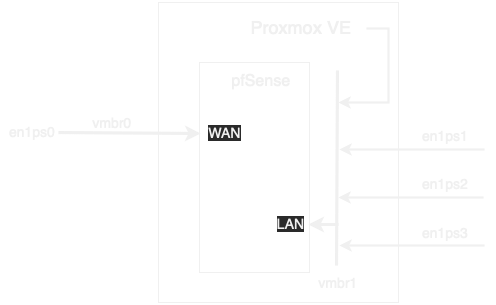
- The soft router machine has four physical network ports: enp1s0, enp2s0, enp3s0, enp4s0.
- The first one acts as the WAN port, and the remaining three serve as LAN ports.
- Proxmox VE can be accessed through the LAN ports.
- The virtualized pfSense under Proxmox VE is used as the Router, dialing PPPoE via WAN.
- Other network devices at home get network access through the LAN.
Issues
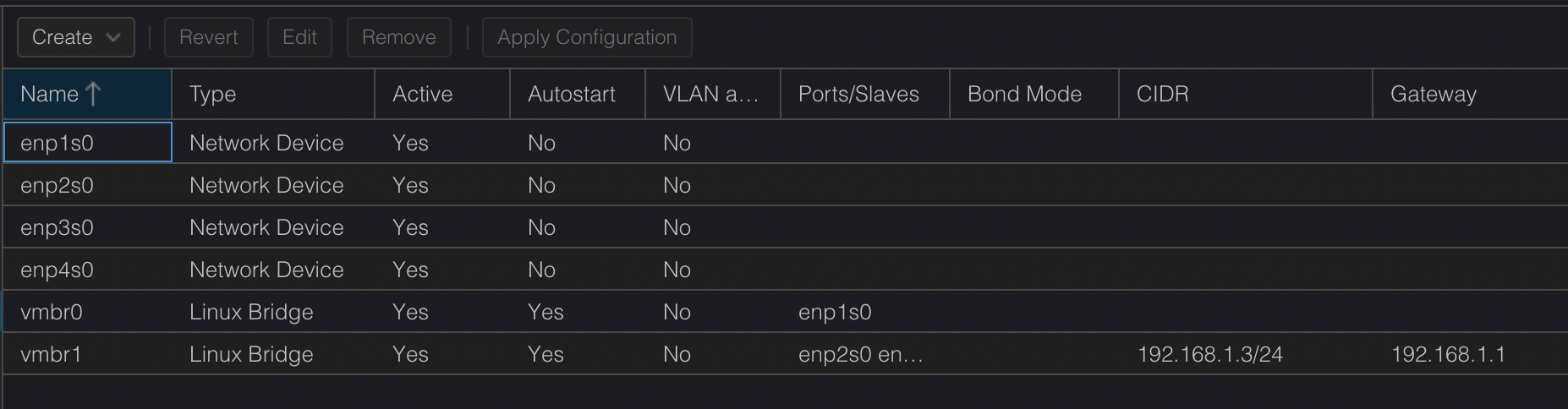
- Initially, Proxmox VE has already created a Linux Bridge, vmbr0, associated with enp1s0, and assigned the previously configured IP 192.168.100.2.
- The computer can only connect to enp1s0 via a cable to configure Proxmox VE.
- The other physical network ports enp2s0, enp3s0, and enp4s0 are associated with vmbr1.
- After pfSense is set up, it can function normally for network dialing and LAN distribution by assigning vmbr0 to WAN and vmbr1 to LAN. However, if this environment is put directly into use, the Proxmox VE management interface cannot be accessed from any machine already connected to the LAN.
- Following the above, if you want to manage Proxmox VE, you have to take the whole machine down and connect via enp1s0, which is extremely inconvenient.
Solution
After researching for a long time, and even once encountering a situation where a mid-way power outage caused all configuration files to be lost and the system wouldn't boot, requiring a Proxmox VE reinstall, I finally figured it out... 🤷♂️
- Remove the default IP and Gateway from vmbr0, and set them on vmbr1 instead.
- Assign the IP setting of vmbr1 to the same subnet as the pfSense LAN, with the Gateway pointing to pfSense 192.168.1.1.
- The default DHCP range for pfSense is 192.168.1.100 ~
This allows access to Proxmox VE through the pfSense LAN ports.
Potential Issues
- The Proxmox VE host must go through pfSense to connect to the external network.
- If pfSense crashes, is stopped during migration, or is down for other maintenance reasons, all devices, including the Proxmox VE host, might lose connectivity.
pfSense vs OpenWRT
Understanding the development context based on product goals is better than arguing over which is superior or inferior for specific uses.
pfSense
- Based on FreeBSD, designed with the goal of being a professional firewall.
- Comprehensive firewall management features and complete management and monitoring functions.
- User interface is well-organized with clear explanatory text.
- Netgate provides commercial paid support, thorough documentation, and corresponding reference documents for various application scenes.
OpenWRT
- Based on Linux, oriented towards small embedded devices, suitable for home wireless routers with relatively low hardware resources.
- Small and lightweight; aside from basic functions, community-maintained packages can be installed via opkg.
- There is documentation, but it is not as user-oriented as the documentation maintained by Netgate for pfSense.
- Basic networking knowledge is required to understand it, or where details are not provided, you need to search for more discussion articles for answers.
- Discussion articles may not always provide the correct answers, requiring self-exploration.
I think both systems are excellent. If it were a wireless router or a machine with very low hardware specs, I would prioritize OpenWRT. But for a machine with a quad-core J1900 CPU and 8GB of RAM, I would consider installing pfSense to play around with.